Energy
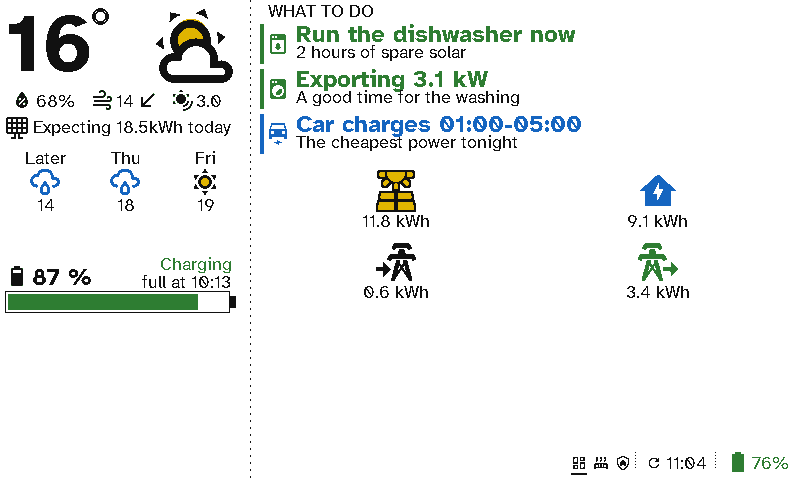
Solar panels, a home battery and a time-of-use tariff only save money if someone acts on them. A viewport in the kitchen or utility room turns the numbers into what to do: run the dishwasher now, the car charges overnight.
The case for Switchboard
- Advice, not graphs. Run the dishwasher now: 2 hours of spare solar is something anyone in the house can act on. A graph in an app isn’t.
- Seen where the decisions are made. The washing machine, dishwasher and car are used by the whole household, not just whoever installed the solar app.
- It only says something when it matters. Each line shows only while its condition is true, so the list is short and always current.
- E-ink costs almost nothing to run. A display that tells you to save energy shouldn’t be a tablet left on all day.
Setting it up
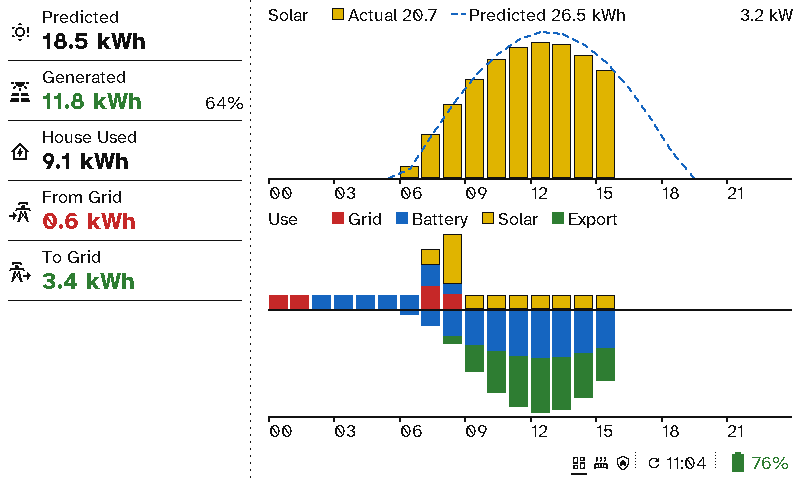
This screen uses the sidebar layout:
- Left: Weather with the solar forecast, then Battery.
- Right: a Now section of entity items, then Energy totals.
Each Now item is a sensor and a condition. For example, a template sensor for the hours of spare solar, shown while it’s over 1. The cheapest window can come from your tariff’s Home Assistant integration. See Viewport layouts.