Facilities
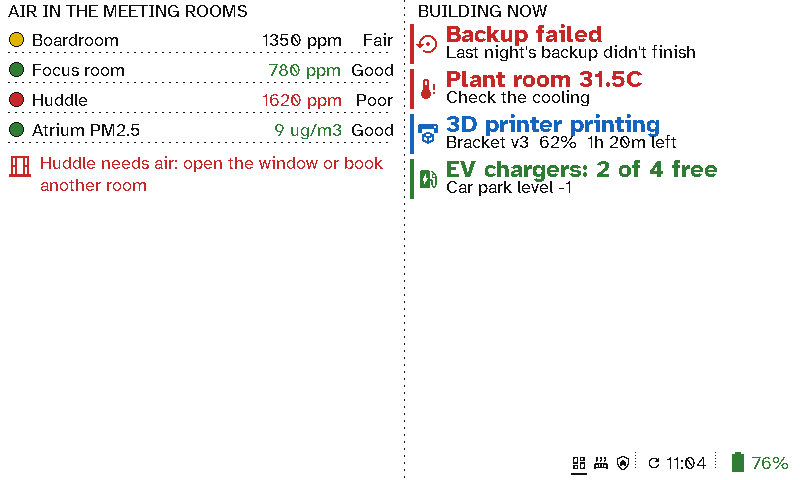
For whoever looks after a building, a viewport in the office or the plant room shows the air in each meeting room, and anything that needs attention: a failed backup, a hot plant room, a print that's running, free EV chargers.
The case for Switchboard
- Problems show up without a dashboard login. Backup failed and Plant room 31.5C appear in red when they happen and disappear when they’re fixed.
- Air quality people act on. CO2 and particles are coloured by sensible limits, or your own. A note such as Huddle needs air: open the window or book another room appears only when the room is poor.
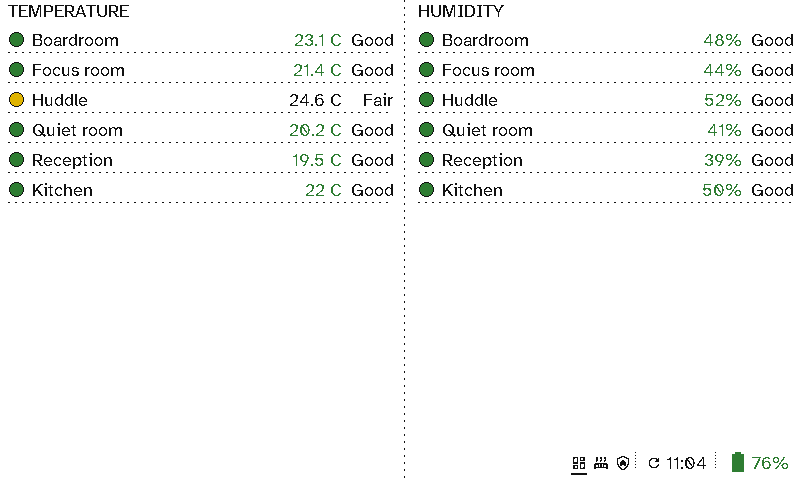
- Every sign is also a sensor. Each viewport can report its room’s temperature and humidity to Home Assistant. Put up twenty room signs and you have twenty comfort sensors at no extra cost.
- Plain sentences, not graphs. Anyone passing can understand EV chargers: 2 of 4 free.
- Put it anywhere. No power or network to run, and months on a charge, so it can go in the plant room, by the car park door or in the kitchen.
- Comes from what Home Assistant already knows. Any sensor or status becomes a line with your wording, colour and icon.
Setting it up
This screen is two columns:
- Left: an Air quality section with one line per sensor, then a Message shown only while the huddle room’s CO2 is over a limit.
- Right: a Now section of entity items, each with a condition, a title such as
Plant room {state}, and a second line.
The comfort screen is two Air quality sections, one for the signs’ temperatures with your own limits (fair from 24°C, poor from 26°C) and one for their humidity.
See Viewport layouts.